Brilliant Guide on Upgrading Spree 1.3.3 to 2.0.4
This is the best guide I have seen for upgrading Spree from 1.3.3 to 2.0.4
Shanghai Internet speed - Updated for 2013
Well things have got better in Shanghai, when I left 18 months ago I have 2M ADSL, then in Hangzhou we got 10M ADSL which they then decided was too fast and said their equipment could only handle 4M so after the end of the first year they downgraded us. Now back in Shanghai we have 20M fiber to the building (FTTB). It flies! I have also noticed that Akamai is now doing a much better job in China, Apple App Store updates are now whizzing down the line at nearly the full 20M.

We launched our wholesale site - Zooron.com
Its been a busy few months, first Gina and I moved back to Shanghai after finding a great apartment here, then we launched our first B2B wholesale site Zooron.com. We launched Zooron because we are fed up of people getting ripped off when buying from China. China is an amazing place with a massive selection of products ready to be sold by retailers but we think it needs someone to organise and safely dispatch those products. We are launching with 300 products, mainly in the business and industrial categories and plan to add many more from our trusted supplier we have worked with over the last 9 years.
Developing a new business park, China style
The pace that China is expanding and growing is still staggering, even after eight years of living here. Sometimes it sneaks up on you, over lunch we realised that the business park, well really a business district, we have our office in has really taken off in the last 6 months. We have been here for just over a year and when we moved in we were one of the first, when you looked up and down the street there was no one about, most of the buildings you see today were there but no one was working in them, one of those ghost towns you hear about, everything was ready and waiting to take off.
Fast forward a year and there are now signs of life but its taken a lot to kick start, for example people don’t get here by themselves they are all bused in and out of this side of town, so at 5.30 the whole street is lined up and down with buses, there is only one convenience store in a 1km radius and we have to go into Alibaba’s corporate office to have a coffee. Now that the larger offices have staff we are seeing the street vendors turn up with their electric trikes serving dirt cheap Chinese food, 6RMB gets you any noodles or fried rice dish and 1.5RMB gets you a north west China style flat bread not unlike a plain naan with a few sesame seeds thrown in for good measure.
The only downside of moving in early is that we got stung with higher than now the average rent, we have 2,000 m2 office / warehouse on the ground floor which we rent for 1.6RMB per m2 per day which as far as rents go is not bad but we learn now the average for the area is 1RMB / m2 / day which would also explain why businesses are moving in now, rather than 18 months ago when these buildings were finished and how they can afford to bus everyone over from down town, have a look at the map to see the commute, it should take 30 mins but in rush hour its more like an hour each way.
View Larger Map
Which is more or less like it works back in the UK, I remember people catching the staff bus from the Leeds city center to the business parks outside the city each day for work.
Getting RVM
I’m not sure where to put this, but I wanted to share this tidbit of info.
I was having an issue where I would see all these hanging /bin/bash processes calling runner and rake that were being fired off by cron. Turns out my .rvmrc file in my app folder was causing the problem. Rvm by default will prompt to trust or not trust the file. This causes bash to hang. The solution I used was to disable the prompt by adding this line to my user rvm file in ~/.rvmrc
rvm_trust_rvmrcs_flag=1
Have a read of the RVM Wiki
Heroku - My new best friend
I just found this great little Heroku tweak that can reduce your downtime when deploying applications, they allow you to preboot the new version before tearing down the old one.
Upgrading Spree from 1.1.2 to 1.1.3
If you upgraded Spree from 1.1.2 to 1.1.3 and found that the checkout didn’t work with some error about zones
1 | ActiveRecord::StatementInvalid (PG::Error: ERROR: column "zone_members_count" does not exist |
Then perhaps you missed that you needed to run some migrations
1 | rake railties:install:migrations |
Google Analytics Funnel Setup for Spree Commerce
During the setup of any new ecommerce system you will need to monitor your checkout for cart abandonment to find the drop off points and carefully fix them, here is how I setup analytics for Spree Commerce 1.1.x.
- Goal Type: URL Destination
- Goal URL: /orders/R[0-9]{1,8}
- Use funnel: Ticked
- Required Step: Ticked
- Step 1: /checkout
- Step 2: /checkout/delivery
- Step 3: /checkout/payment
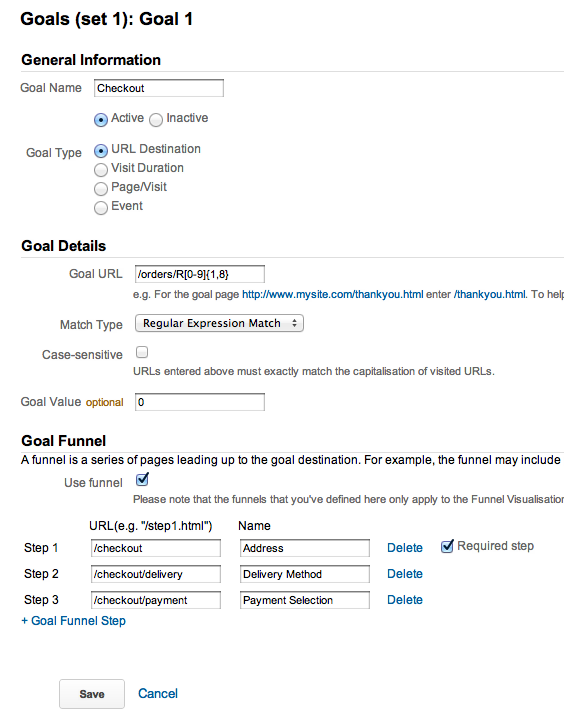
Thanks to Ryan for the RegEx
Non-www to www nginx redirect
Add this small block of code into your server{} block to redirect all non-www to the www version of your website.
1 | if ($host != 'www.samhamilton.co.uk' ) { |